Map
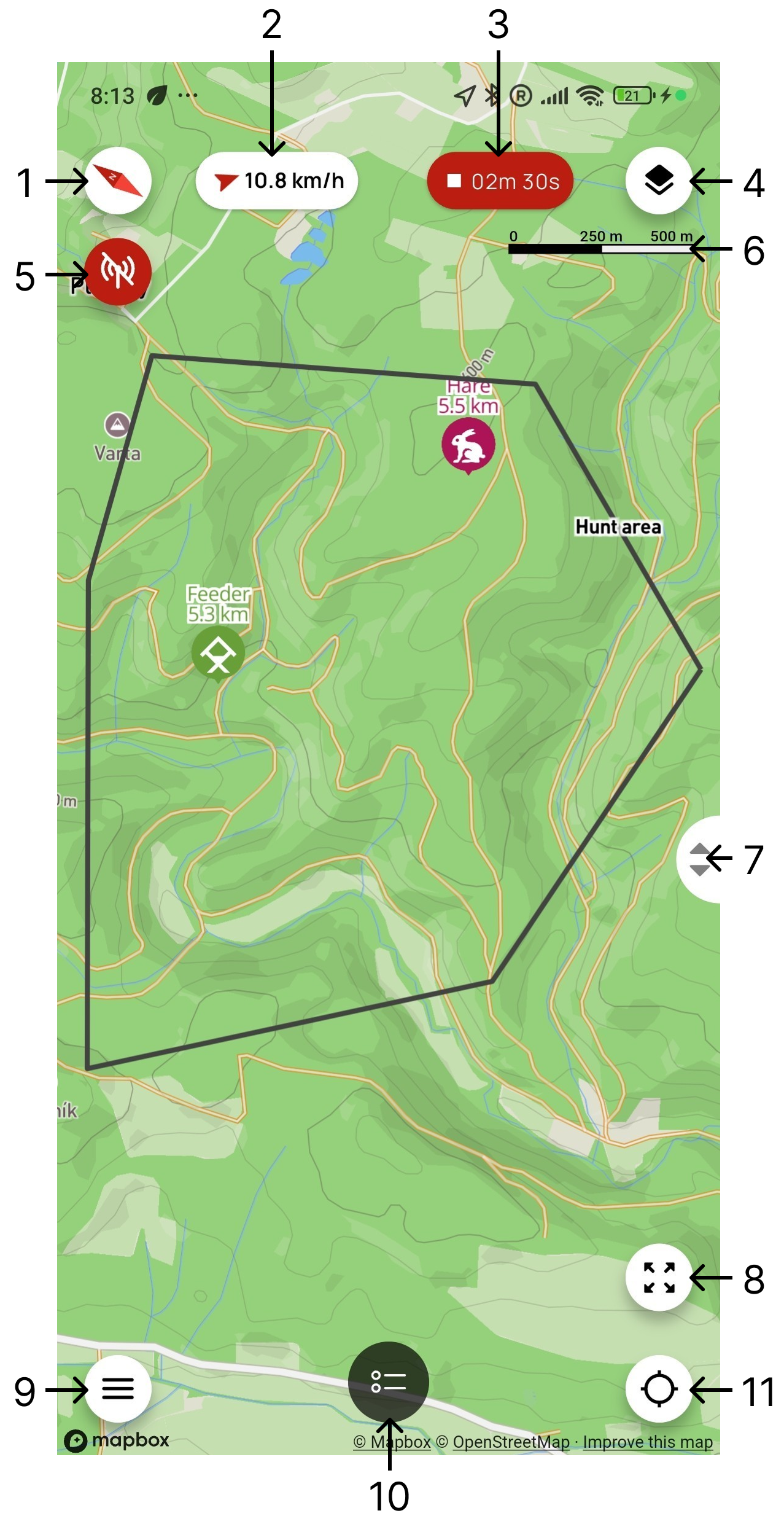
- Map orientation – indicates the direction of north. Tap the button to rotate the map so that north faces up.
- Wind – displays the wind direction and speed in km/h. Tap the indicator to open the weather forecast.
- Track recording – when recording is active, displays its elapsed time. Tap the button to pause, resume, or stop recording.
- Map layers – switches between four map types:
- Basic – an online map that requires the phone to be connected to the internet.
- Satellite – an online satellite map that requires the phone to be connected to the internet.
- Offline – a previously downloaded map that can be used without internet access.
- Custom – your own map uploaded in MBTiles format.
- Controller connection – indicates that no X30 or X40 controller is connected. Tap the button to open the list of found devices.
- Map scale – shows the relationship between a distance on the map and the actual distance.
- Map zoom – slide the control up or down to zoom the map in or out.
- Show all devices – centers the map and adjusts the zoom level to show all your devices (dogs and hunters).
- Menu – opens the app's main menu.
- Device list – tap the button to slide the device list up from the bottom of the screen.
- Multifunction button – performs one of three functions depending on the selected mode:
- Zoom to user location – centers and zooms the map on your location.
- Camera lock – sets the map so that north always faces up. As you move, the map automatically pans to keep your location in the center of the screen.
- Rotate with phone – continuously rotates the map according to the direction in which the phone is pointing.
ATTENTION
Weather is available only when the user is signed in and the mobile app has access to the internet.
Touch Controls on the Map
Press and hold an empty area of the map to open a menu with the following options:
Dog icon on the map:
- After a tap, the training functions for that dog are displayed.
- After pressing and holding, the device details for the selected dog open.
Waypoint icon on the map:
- After a tap, the map view adjusts to show all waypoints. At the same time, their list slides up from the bottom of the screen.